
The Flowrev smart interpreter, part of our auto-date feature, analyzes transaction (invoice/bill/credit note/...) line description fields to infer any revenue/cost recognition rule and service dates implied by descriptive text on the transactions lines. Additionally, upon transaction load (from Xero, QuickBooks, ...) the smart interpreter reads precisely formatted service dates from transaction line descriptions and the reference field, and applies it as described here.
To use it click any number shown on the
- Revenue page's "Sales" or "Review RevRec" row
- Costs page's "Bills" or "Review CostRec" row
then click the "glasses" icon on the respective page.
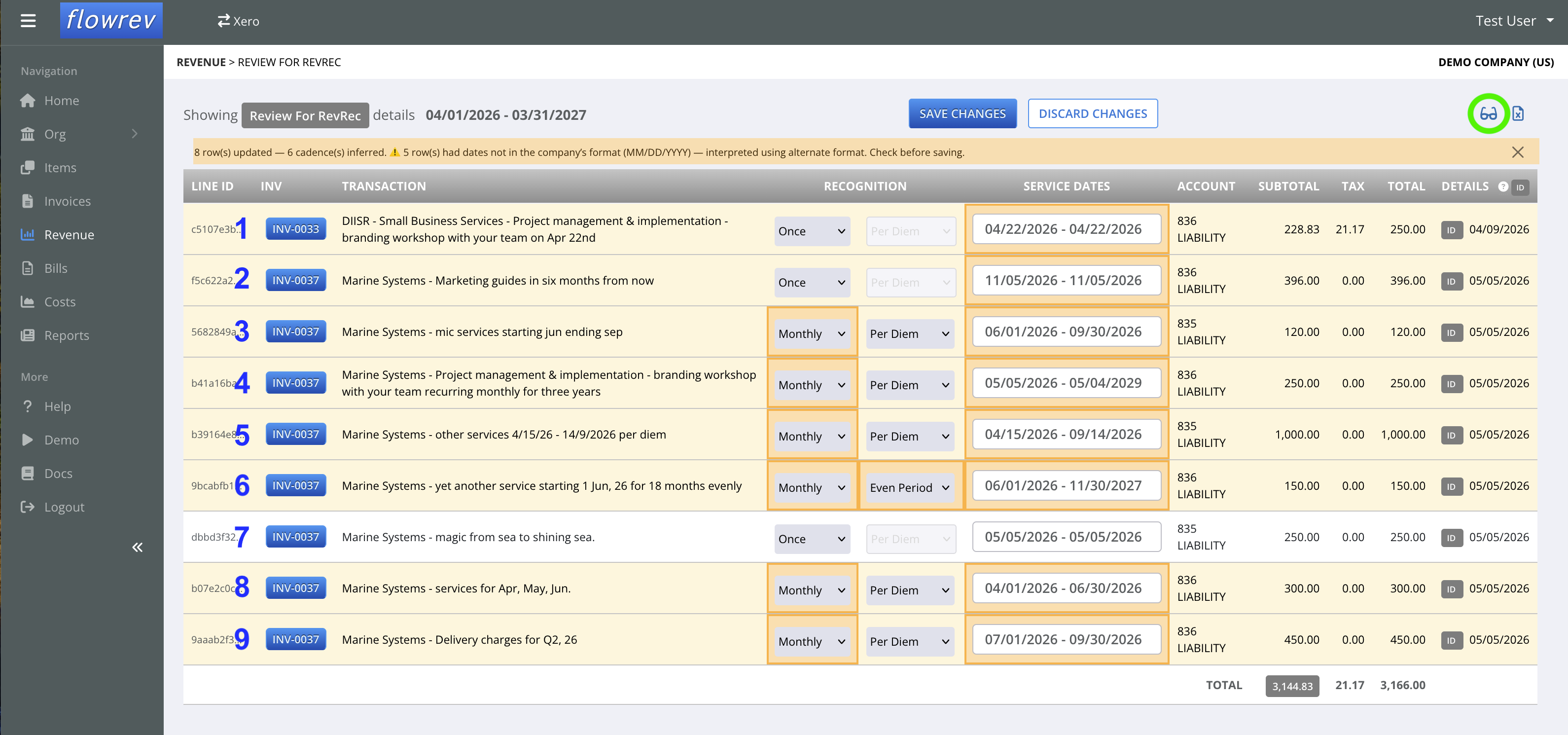
Upon page load, any company/item recognition rules or service dates rules, etc already applied when the invoice was loaded to Flowrev from the accounting system will be shown. When the glasses icon is clicked, the system will analyze each line to determine if any further changes are needed. Any change it identifies and applies will be highlighted on each line as shown above for the user to review, potentially edit - since such system inferred values can be subject to potential alternate interpretation, then save using SAVE. Thereafter schedules can be created from the Revenue/Costs page by using GENERATE REVENUE/COSTS SCHEDULE button on the respective page.
Line 1: The service date of April 22, 2026 (year implied by invoice date) is set. The line's default Once recognition method remains unchanged.
Line 2: The service date of Nov 5, 2026 is computed from the line description - six months from now - where now is taken to be the invoice date.
Line 3, 4, 5: The service date and recognition method is inferred and set. The baseline Per Diem method prior set remains unchanged. Line 5 demonstrates how dates in non-standard company format ( MM/DD/YYYY for this US demo company - the default date format is country sensitive ) is read and correctly interpreted.
Line 6: The recognition method and service dates is inferred and set. Appearance of "evenly" overrides the company's Per Diem computation rule set.
Line 7: Did not need any overrides.
Line 8, 9: The recognition method and service dates is inferred and set. Line 9 demonstrates how the system can read and apply fiscal quarter type information too.
Note: The above data can also be exported to Excel, the relevant fields (recognition cadence and computation and service dates) edited and the data loaded back into the system. Contact support to have import enabled.